
With Forms for Salesforce, you can capture data to combine account and contact fields into a single record to create Person Accounts to store information about individual persons.
When you create a Person Account, relationships for the Contact are available to the Account object. As a result, in Forms for Salesforce, relationships related to the Contact are available for an Account. For example, a form with the primary object of the Account can include related objects via a Contact Id rather than an Account Id.
In a Health Cloud household model, this creates instances where you can create Contact-Contact Relationships via the Contact or Related Contact. Additionally, an Account-Contact Relationship can also be created via the Contact.
NOTE: In the metadata, these relationships have Person prepended to the Relationship Name for the standard relationships and __pr appended for custom relationships.
Account-Account Relationships are used to relate an Account to another Account.
NOTE: These relationships are not used to relate a Person Account to another Person Account.
For example, you may need to create a relationship between a payer, Bloomington Health Plans, and a provider, Patient Shuttle Co. With Forms for Salesforce you can utilize the junction object to capture the Account IDs of both Accounts (Payer and Provider in this case) on the form:

Account-Contact Relationships are used to relate an Account to a Contact. These relationships are commonly used to relate an Account to a Person Account or Contact. For example, Household Accounts can relate to a Person Account in Health Cloud.
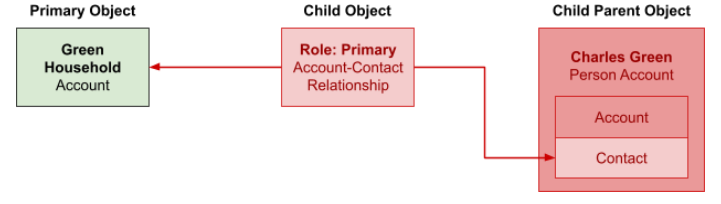
The Household Account can be created or updated without issues with Forms for Salesforce if the Household Account is the Primary Object of a form.
The Account-Contact Relationship can be added to the form as a child object of the Account. However, the relationship to the Person Account is available via the Contact ID.
This allows for a Contact to be added to the form as a grandchild object, but to create a Person Account, the Account object needs to be created. Since the Person Account cannot be created successfully, the Account-Contact Relationship will also fail because the Contact lookup is a required field:
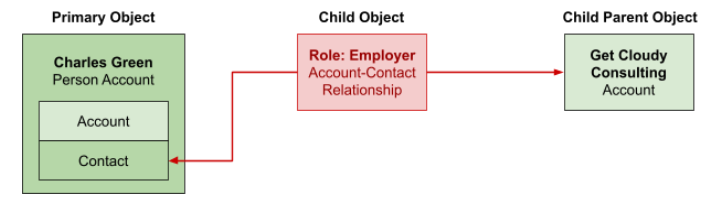
The inverse of this relationship also causes issues.
In this example, the Person Account is the primary object which indicates that the Account is the object used on the form. The Account-Contact Relationship can be added to the form as a child object of the Contact and ultimately the Account can be added as a grandchild object. In this instance, both the Person Account and Account can be created with Forms for Salesforce. However, since the relationship between the Person Account and Account-Contact Relationship is via the lookup to the Contact, Forms for Salesforce will fail to set this field because the Account object is the object on the form. This ultimately leads to a failure to create the Account-Contact Relationship:
There are instances where an Account may need to be related to a Contact that is not a Person Account. In the example below, Anna Jones is an employee of Patient Shuttle and is a Contact. In instances where a Salesforce org has been configured with custom Record Types to allow Contacts to be created without creating Person Accounts, this is possible.
When the Account-Contact Relationship is used to relate an Account directly to a Contact, it is fully supported by Forms for Salesforce:

Contact-Contact Relationships are used to relate two Contacts. With Person Accounts, this is how a Person Account is related to another Person Account.
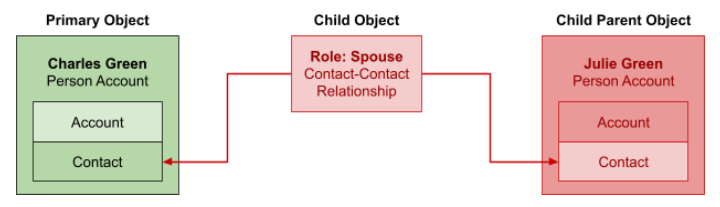
A common occurrence of a Contact-Contact Relationship is between members of a household. Several family relationships are represented in the roles delivered with Health Cloud. For example, Charles Green, a patient, is related to their spouse Julie Green, who is also represented with a Person Account.
In Forms for Salesforce, these relationships cause issues because of the Contact Lookups on the Contact-Contact Relationship. While there are no issues adding a Person Account as the primary object of a form (the Account object can be used) and the Contact-Contact Relationship will be available as the child object for the Contact and Related Contacted, only the Contact object is available for the grandchild object and this causes an issue if another Person Account needs to be created. The Person Account creation will fail and the Contact-Contact Relationship will not be created:
Another use of Contact-Contact Relationships is to relate a Person Account with a Contact, such as relating a patient, Charles Green, with a provider, Anna Jones. Because in this instance a Person Account does not need to be created as the grandchild object, Forms for Salesforce can successfully create all the objects on the form:
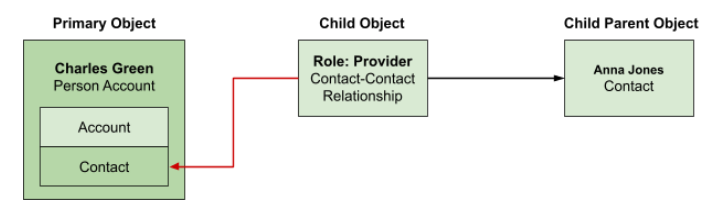
However, since the Contact-Contact Relationship in this example is related via a lookup to the Contact, the form will fail to create the relation back to the Person Account. This is because the form does not reference the Contact ID of the Person Account.
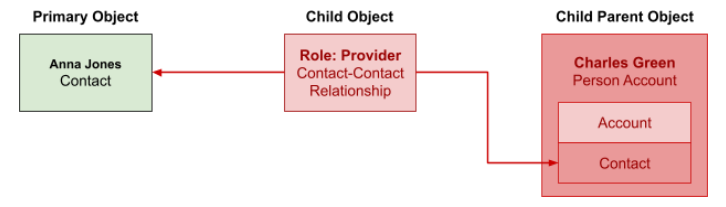
In instances where the above relationship is inverted and the primary object is the Contact, Forms for Salesforce can create the Contact. However, it will not be able to successfully create the Person Account as a grandchild object. This will subsequently cause the Contact-Contact Relationship to fail because the parent Contact fails.
In specific use cases where all objects can be created but a particular relationship cannot be established, a Flow or After-Insert Trigger could potentially be used to create the relationship.
For example, for a form that was creating a Person Account, Contact-Contact Relationship, and Contact, all three objects can be created successfully, but the Person Account will not be related to the Contact-Contact Relationship.
Automation can be used with the Formstack Submission and/or Form Submission records to identify the appropriate records that were created and set the Lookup Field on the Contact-Contact Relationship to the appropriate Contact Id for the Person Account.
Any solution that can be configured to support Person Accounts and relationships, including the Household Data Model, requires creating a custom object. The custom object serves two purposes:
After creating the custom object to act as a proxy on the form, the second step of the solution is to configure or develop the automation to create the appropriate junction objects. Here the solution can deviate based on scope and personal preference. Either Flow or Apex can be used to implement the necessary automation. The more targeted a solution is to a particular use case or data model, the less complexity is required. While Flow is capable of controlling the automation, as requirements broaden and the use cases expand, the more appropriate and fitting Apex becomes.
The automation required must accomplish the following:
When you create a Person Account, relationships for the Contact are available to the Account object. As a result, in Forms for Salesforce, relationships related to the Contact are available for an Account. For example, a form with the primary object of the Account can include related objects via a Contact Id rather than an Account Id.
In a Health Cloud household model, this creates instances where you can create Contact-Contact Relationships via the Contact or Related Contact. Additionally, an Account-Contact Relationship can also be created via the Contact.
NOTE: In the metadata, these relationships have Person prepended to the Relationship Name for the standard relationships and __pr appended for custom relationships.
Account-Account Relationships
Account-Account Relationships are used to relate an Account to another Account. NOTE: These relationships are not used to relate a Person Account to another Person Account.
For example, you may need to create a relationship between a payer, Bloomington Health Plans, and a provider, Patient Shuttle Co. With Forms for Salesforce you can utilize the junction object to capture the Account IDs of both Accounts (Payer and Provider in this case) on the form:
Account-Contact Relationships
Account-Contact Relationships are used to relate an Account to a Contact. These relationships are commonly used to relate an Account to a Person Account or Contact. For example, Household Accounts can relate to a Person Account in Health Cloud. The Household Account can be created or updated without issues with Forms for Salesforce if the Household Account is the Primary Object of a form.
The Account-Contact Relationship can be added to the form as a child object of the Account. However, the relationship to the Person Account is available via the Contact ID.
This allows for a Contact to be added to the form as a grandchild object, but to create a Person Account, the Account object needs to be created. Since the Person Account cannot be created successfully, the Account-Contact Relationship will also fail because the Contact lookup is a required field:
The inverse of this relationship also causes issues.
In this example, the Person Account is the primary object which indicates that the Account is the object used on the form. The Account-Contact Relationship can be added to the form as a child object of the Contact and ultimately the Account can be added as a grandchild object. In this instance, both the Person Account and Account can be created with Forms for Salesforce. However, since the relationship between the Person Account and Account-Contact Relationship is via the lookup to the Contact, Forms for Salesforce will fail to set this field because the Account object is the object on the form. This ultimately leads to a failure to create the Account-Contact Relationship:
There are instances where an Account may need to be related to a Contact that is not a Person Account. In the example below, Anna Jones is an employee of Patient Shuttle and is a Contact. In instances where a Salesforce org has been configured with custom Record Types to allow Contacts to be created without creating Person Accounts, this is possible.
When the Account-Contact Relationship is used to relate an Account directly to a Contact, it is fully supported by Forms for Salesforce:
Contact-Contact Relationships
Contact-Contact Relationships are used to relate two Contacts. With Person Accounts, this is how a Person Account is related to another Person Account.A common occurrence of a Contact-Contact Relationship is between members of a household. Several family relationships are represented in the roles delivered with Health Cloud. For example, Charles Green, a patient, is related to their spouse Julie Green, who is also represented with a Person Account.
In Forms for Salesforce, these relationships cause issues because of the Contact Lookups on the Contact-Contact Relationship. While there are no issues adding a Person Account as the primary object of a form (the Account object can be used) and the Contact-Contact Relationship will be available as the child object for the Contact and Related Contacted, only the Contact object is available for the grandchild object and this causes an issue if another Person Account needs to be created. The Person Account creation will fail and the Contact-Contact Relationship will not be created:
Another use of Contact-Contact Relationships is to relate a Person Account with a Contact, such as relating a patient, Charles Green, with a provider, Anna Jones. Because in this instance a Person Account does not need to be created as the grandchild object, Forms for Salesforce can successfully create all the objects on the form:
However, since the Contact-Contact Relationship in this example is related via a lookup to the Contact, the form will fail to create the relation back to the Person Account. This is because the form does not reference the Contact ID of the Person Account.
In instances where the above relationship is inverted and the primary object is the Contact, Forms for Salesforce can create the Contact. However, it will not be able to successfully create the Person Account as a grandchild object. This will subsequently cause the Contact-Contact Relationship to fail because the parent Contact fails.
Solutions
In specific use cases where all objects can be created but a particular relationship cannot be established, a Flow or After-Insert Trigger could potentially be used to create the relationship.For example, for a form that was creating a Person Account, Contact-Contact Relationship, and Contact, all three objects can be created successfully, but the Person Account will not be related to the Contact-Contact Relationship.
Automation can be used with the Formstack Submission and/or Form Submission records to identify the appropriate records that were created and set the Lookup Field on the Contact-Contact Relationship to the appropriate Contact Id for the Person Account.
Custom Objects
Any solution that can be configured to support Person Accounts and relationships, including the Household Data Model, requires creating a custom object. The custom object serves two purposes:
- The custom object can have a collection of Lookup Fields to the Account and Contact objects. This creates a junction object that can be used on a form to give a user the ability to create and/or update Person Accounts that are traditionally related through the Person Contact Id.
- Logic can be added when custom object records are created to replicate and/or move data to the delivered objects that should be used with the data model.
Automation (Flow or Apex Trigger)
After creating the custom object to act as a proxy on the form, the second step of the solution is to configure or develop the automation to create the appropriate junction objects. Here the solution can deviate based on scope and personal preference. Either Flow or Apex can be used to implement the necessary automation. The more targeted a solution is to a particular use case or data model, the less complexity is required. While Flow is capable of controlling the automation, as requirements broaden and the use cases expand, the more appropriate and fitting Apex becomes.The automation required must accomplish the following:
- Identify if an Account created and/or updated by a form is a Person Account.
- Determine if the relationship to be created is related via the Account or Contact object and use the appropriate Record Id.
- Map any fields from the custom object to the junction object.